TikTok prerequisites: Business (or Creator) account and a public account before connecting Perroly
Perroly connects to through TikTok’s official API, like other scheduling tools. Two settings on TikTok’s side need checking before connecting your account: a Business account (or Creator), and a public account. The second point is not optional: a private account simply stops TikTok from publishing anything sent by a third-party tool like Perroly.
One important detail to keep in mind while making these changes: even once both points are in order, posts scheduled from Perroly still go out today with Only you visibility, until Perroly passes TikTok’s platform audit. These account settings will not lift that limit — only passing the audit will. See the FAQ below.
Before you start
Two points to check before connecting TikTok to Perroly, both in the TikTok app’s settings, not in Perroly.
- The account must be a Business account (recommended) or Creator, never a standard personal account.
- The account must be public, not private: this is a full block, not a minor convenience setting. A private account stops any publishing sent by a third-party tool like Perroly.
- Both settings are free, reversible, and take a few seconds from the TikTok mobile app.
Switch your TikTok to a Business (or Creator) account
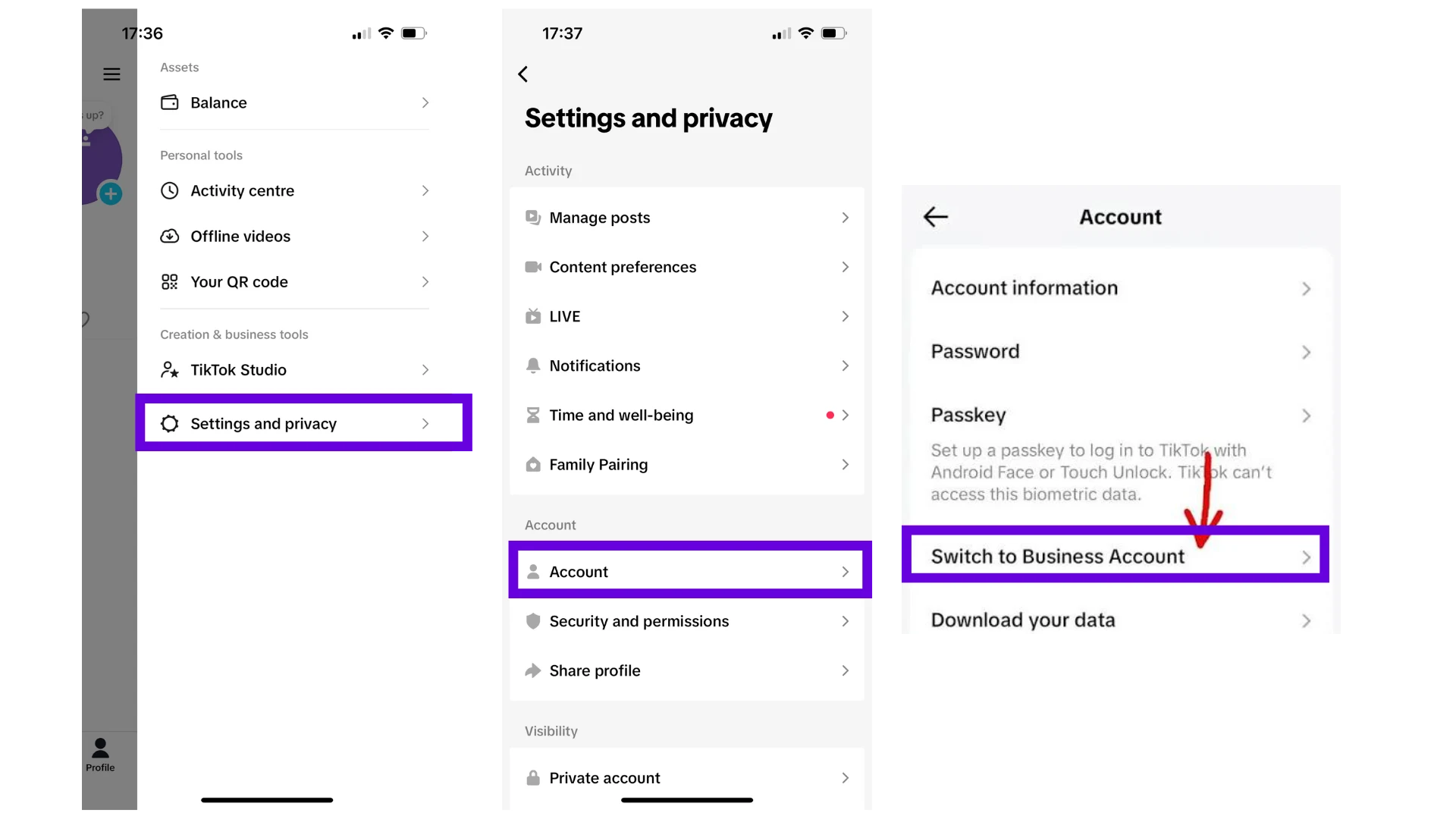
From the TikTok app: Profile > Menu (☰) > Settings and privacy > Account > Switch to Business account, then pick Business. Creator also works to connect Perroly, but Business unlocks more analytics and is built for a business rather than an individual content creator.
If an account is already set to Creator, there is no need to switch to Business: both types allow connecting through TikTok’s API.
Switch the account to public
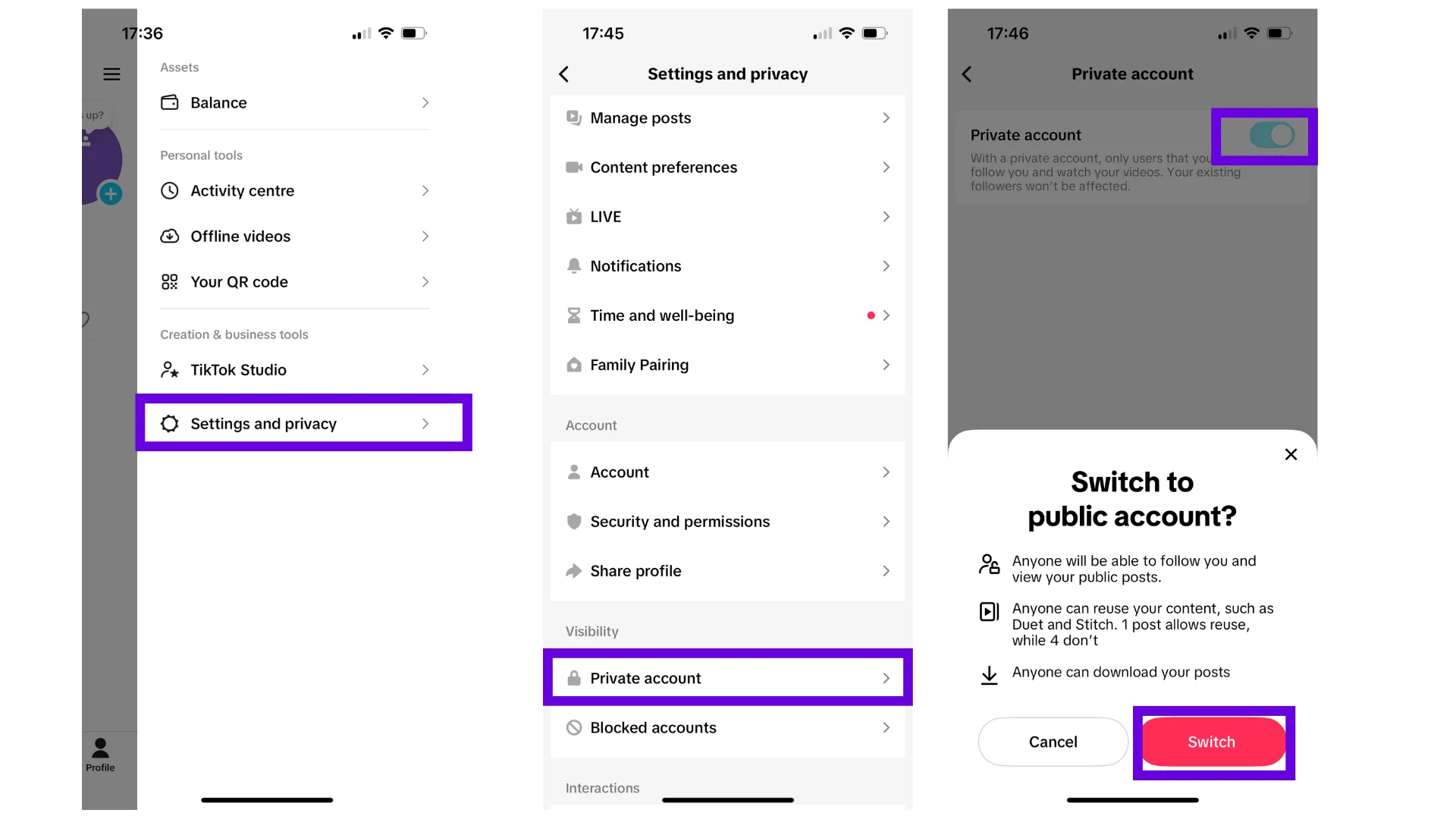
This setting is not optional: as long as the account stays private, TikTok simply blocks publishing through a third-party tool like Perroly — the connection itself may still succeed, but nothing will actually post. The account needs to be public for anything to publish from Perroly.
From the TikTok app: Profile > Menu (☰) > Settings and privacy > Privacy > Private account, then turn the toggle off. A "Switch to public account?" confirmation appears: confirm with Switch. If a Business account was created directly for a business, it is usually already public by default; this setting mostly matters for an existing account converted from a personal one.
What these settings change — and what they do not
A Business (or Creator) account that is public unlocks connecting to Perroly and detailed analytics. It does not, however, change the visibility of posts scheduled from Perroly today: it stays Only you, until Perroly passes TikTok’s platform audit. That is a limit TikTok applies to every third-party tool in the same situation, independent of these two account settings.
Personal account vs Business or Creator account
Connect your TikTok account to Perroly
Once both points are checked, go to Perroly > Accounts, click Connect TikTok, and follow TikTok’s official window: sign in to your account, then accept the requested permissions (publishing, analytics).
Do not uncheck any of them. Like on other networks, a single disabled permission can break publishing or reading analytics, with no error message to warn you.
Frequently asked questions
Do I have to switch to a Business account, or is Creator enough?
Both work to connect Perroly. Business unlocks more analytics and suits professional use better; Creator remains a valid option if that is already your current setup.
My account is private, what happens if I try to publish from Perroly anyway?
Publishing simply fails. A private account blocks any publishing sent by a third-party tool, regardless of what is set up on Perroly’s side: switch the account back to public before scheduling anything.
Why do my posts scheduled through Perroly stay "Only you" even after these settings?
Because that specific limit does not come from your account but from the platform audit Perroly still needs to pass with TikTok. It applies to every third-party tool in the same situation and will lift automatically once the audit is passed, with no action needed on your end. The account still needs to stay public regardless, that part is unrelated.
Is it a problem to switch my account back to private later?
Yes, and it is not a minor detail: setting the account back to private blocks any publishing sent from Perroly again, not just some visibility options. Better to leave it public as long as the account stays connected to third-party tools.
Does switching to a Business account change anything for my followers?
No, the experience stays the same for your followers. A Business or Creator account simply unlocks detailed analytics and the ability to connect tools like Perroly.
Can I switch back to a personal account afterward?
Yes, TikTok lets you switch a Business or Creator account back to personal from the same settings, but the connection to Perroly then stops working until the account is professional again.