Error "the account owner has disabled Direct message access" on Instagram
This message can show up without anything having changed on the connection side: "The account owner has disabled access to Instagram Direct Messages" (code 200, subcode 2534041). It is not a Perroly bug or a broken connection: it is an Instagram-side privacy setting, separate from the permissions granted when the account was connected, and it can end up disabled without anyone deciding to turn it off.
Recognizing the error
The most common sign: no new Instagram messages show up in Messaging for that account anymore, or sending a message fails, with no error shown by Instagram itself.
Why it happens
Instagram has a separate privacy setting controlling whether apps connected through the API — Perroly like any other — can read and send Direct messages, independent of the permissions already granted when the account was connected. This setting is sometimes off by default, notably on an account recently switched to professional, or gets reset by Instagram after certain account changes, without anyone actively deciding to turn it off.
That is why it sometimes hits several client accounts at once with no apparent link between them: not a Perroly problem, not something the client did "wrong", just an Instagram setting that needs turning back on.
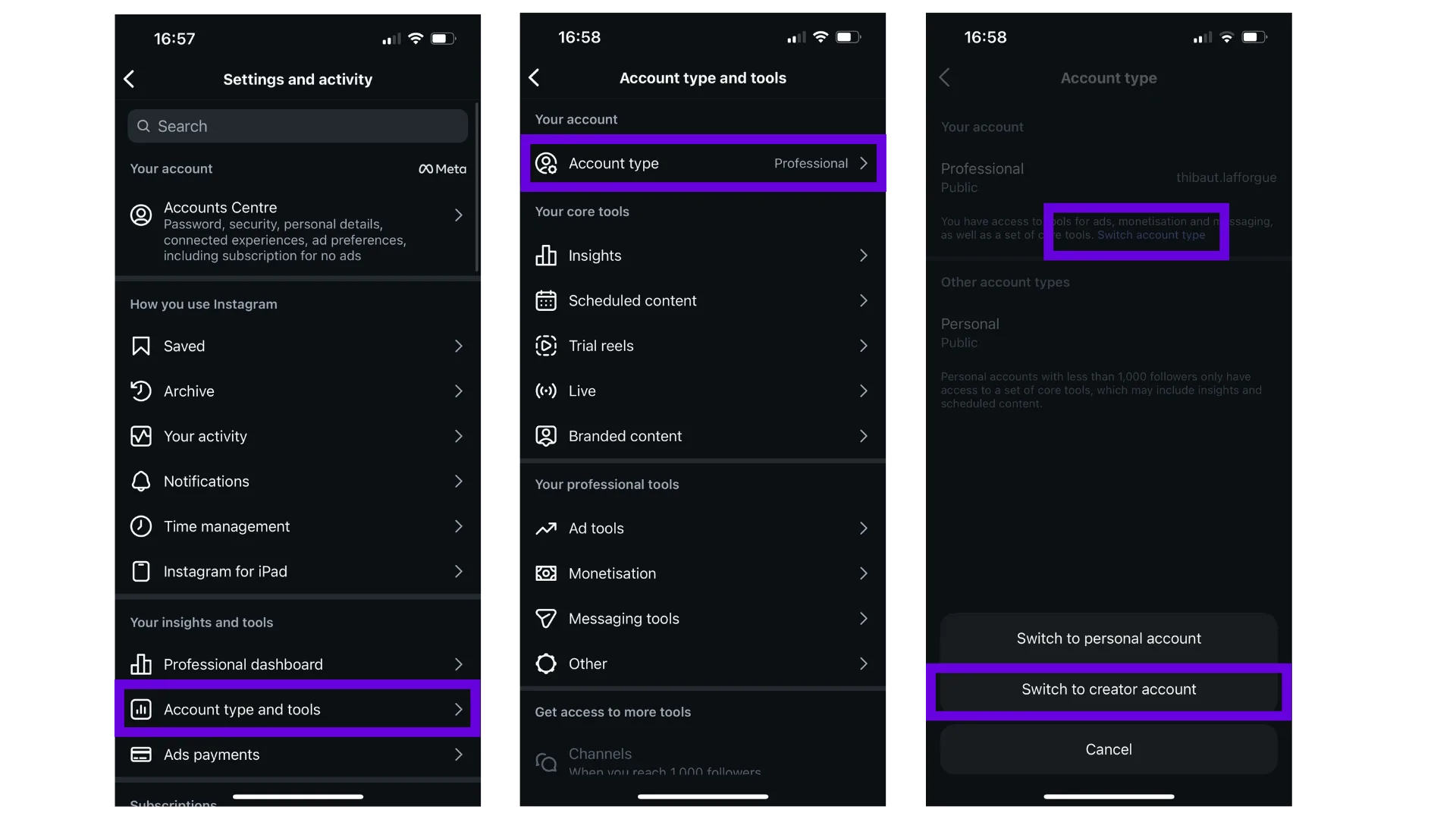
Check that the account is set to professional
The "Allow Access to Messages" setting only exists on a professional account (Business or Creator): on an account still personal, or switched back to personal by mistake, this setting shows up nowhere and Perroly hits the same error.
Switching an account’s type is one of the changes that can reset this setting back to off (see the previous section): if the account type was touched recently, that is the first thing to check before looking further.
From the Instagram app: Profile > Menu (☰) > Settings and privacy > Account type and tools, and pick Creator rather than Business if the choice comes up. Full steps if a conversion is needed: Instagram and Facebook prerequisites guide.
In practice, on an account already set to Creator, this setting is most often already on by default: it is mainly on an account that stayed on Business, or an older account, that it needs turning on manually (next section).
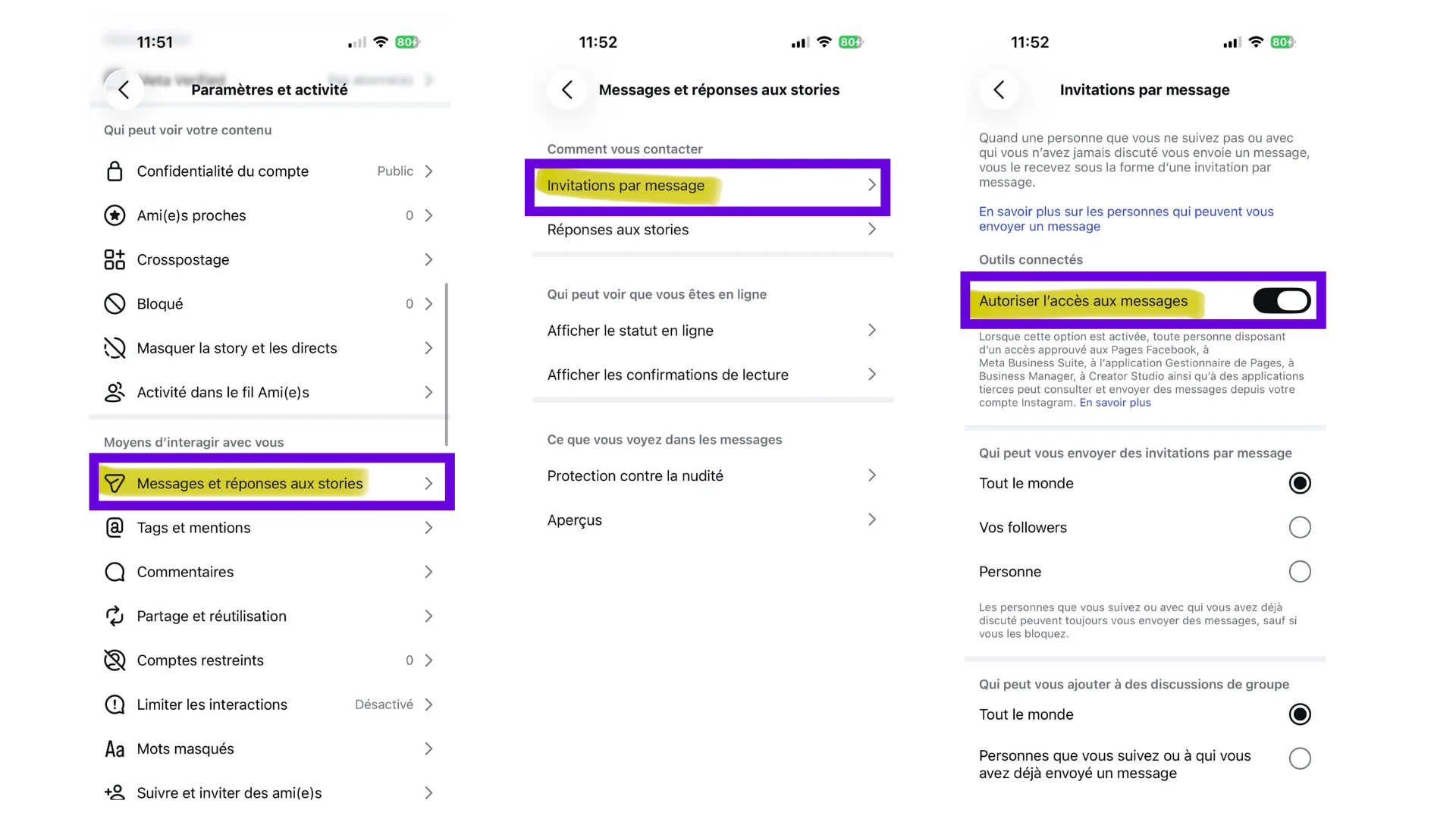
Allow access to messages from Instagram
From the Instagram app, on the affected account: Profile > Menu (☰) > Settings and privacy > Privacy > Messages, then under Connected Tools, turn on Allow Access to Messages.
Exact menu wording varies by app language and version — if a label does not match exactly, look for a setting mentioning third-party apps or tools accessing messages.
Reconnect the account in Perroly
This setting does not apply retroactively to an already-established connection: an account connected to Perroly before turning it on keeps the old access. Go to Perroly > Accounts, then reconnect the affected Instagram account so an up-to-date access is issued.
Check that it is fixed
Go back to Messaging, open an Instagram conversation for that account and send a test message: if it goes out without error and a message sent from outside shows up in Perroly, the setting is in order.
Frequently asked questions
Is this a Perroly bug?
No. It is an Instagram-side privacy setting, independent of Perroly and of any other third-party platform connected to the account.
Does it also block publishing on that account?
No, only messaging. Scheduled publishing and analytics do not depend on this setting.
The client did not change anything, why did this setting turn off?
It is sometimes off by default on an account freshly switched to professional, or reset by Instagram after certain account changes (Business Portfolio, verification…), without there necessarily being an active decision by anyone.
I have access to Perroly’s technical logs, what is the exact error message?
Code 200, subcode 2534041, type OAuthException — "The account owner has disabled access to Instagram Direct Messages." Useful to confirm the diagnosis on the support side, but not needed to apply the fix above.
Does this affect Facebook messages too?
No, this setting is specific to Instagram. A Facebook Page’s messaging does not depend on this control.
I turned the setting on and reconnected the account, still nothing: what now?
Check that the account you reconnected is indeed the one the setting was changed for (useful when managing several Instagram accounts), then contact Perroly support if the issue persists.